ReelShort is generally safe to download if you use the Apple App Store or Google Play, but that does not mean every part of the app is low-risk. The bigger things to check are privacy, coin purchases, subscription renewal, and whether the drama content is suitable for the person using it.
Is ReelShort a Safe App?
For basic legitimacy, ReelShort appears to be a real short-drama streaming app rather than an obvious fake or malware app. The safer way to think about it is this: it is usually okay for device safety when installed officially, but you should be more careful with spending, tracking, and content.
Official app store availability
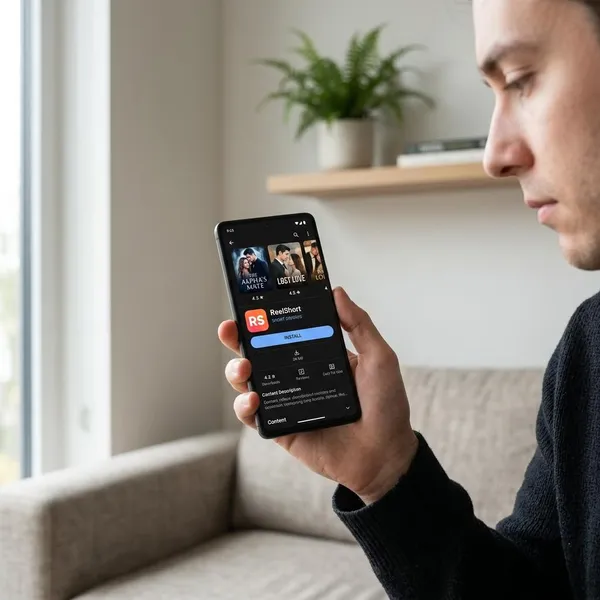
ReelShort being listed in official app stores is a good sign. It means you can check the developer name, reviews, update history, privacy labels, and purchase details before installing.
That does not make the app perfect. App-store approval mainly lowers the chance of a fake installer or obvious malware; it does not guarantee that every user will like the pricing model or privacy practices.
Privacy and data collection
Privacy is worth checking before you create an account. Like many streaming and entertainment apps, ReelShort may collect data such as device identifiers, app activity, account details, or viewing behavior, depending on the version and your settings.
- Check the App Privacy or Data safety section before signing in.
- Skip optional account links if you do not need them.
- Turn off non-essential permissions, especially notifications if you do not want frequent prompts.
Payment and subscription risks
The biggest practical risk for many users is money, not malware. ReelShort may be free to install, but locked episodes, coins, trials, and subscriptions can make the total cost less obvious while you are watching.
Age and content restrictions
ReelShort is not the kind of app I would treat as automatically kid-friendly. Many short dramas are built around romance, betrayal, revenge, power dynamics, and suggestive situations.
For adults, that may simply be the appeal of the app. For younger children or shared family devices, it is a reason to preview the content first instead of judging safety only by whether the app installs cleanly.
Is ReelShort Safe to Download?
ReelShort is safest to download from official app stores. The main download danger comes from unofficial APKs, copycat apps, and websites promising free coins, VIP access, or unlocked episodes.
Apple App Store downloads
On iPhone, downloading ReelShort from the Apple App Store is usually the safest option. Apple's store review and built-in subscription management reduce the risk of fake payment pages or altered app files.
You should still check the subscription screen carefully. App Store download safety does not remove the need to understand renewal dates, coin costs, or content suitability.
Google Play downloads
For Android users, Google Play is the safer route because it provides developer information, store reviews, Data safety details, and Google-managed billing.
This matters more on Android because sideloading is easier. If you see a version outside Google Play that claims to offer premium features for free, treat it as a warning sign rather than a bargain.
Risks of unofficial APKs
Unofficial ReelShort APKs are not a safe shortcut. A modded file can copy the name, icon, and screenshots of the real app while adding adware, spyware, fake login pages, or aggressive permission requests.
The risk is especially high if the site promises "unlimited coins" or "VIP unlocked." That kind of offer is exactly where people often trade a small saving for a much larger security problem.
App permissions and security
A short-drama app normally needs internet access and may request notifications. Be more cautious if it asks for access that does not match streaming, account use, or downloads.
- Before installing: check the developer, reviews, update date, and store privacy section.
- After installing: deny permissions that feel unnecessary and see whether the app still works.
- Before paying: confirm whether the charge is one-time, coin-based, weekly, or monthly.
What Are the Main ReelShort Safety Concerns?
The main concerns are not all the same type. Device safety is mostly about where you download the app. Consumer safety is about spending. Privacy safety is about what data may be collected. Content safety is about who is watching.
Personal data collection
ReelShort may collect personal or device-related information to run the service, personalize viewing, measure activity, or support payments. Store disclosures and policies are the best places to check the current details because app practices can change.
If you want to limit exposure, use only the information required to create an account, avoid connecting unnecessary third-party accounts, and look for options to delete or manage your data if you stop using the app.
Privacy and tracking
Tracking is different from basic account data. It can include patterns such as what you watch, when you watch, which titles you finish, and how you respond to recommendations or prompts.
If that tradeoff bothers you, adjust privacy settings on your phone, limit ad tracking where available, and avoid using the app as a logged-in service unless you actually need the benefits.
In-app purchases
In-app purchases deserve attention because short episodes can make spending feel unusually quick. A user may unlock one episode, then another, then another, without stopping to compare the total cost with a normal streaming subscription.
| Use pattern | What to watch for | Safer choice |
|---|---|---|
| Trying the app once | Impulse coin buys after cliffhangers | Stay with free episodes first |
| Following one full series | Total unlock cost | Set a spending limit before watching |
| Regular weekly use | Renewing plans and repeated purchases | Check whether a subscription is actually cheaper |
Automatic subscription renewals
Automatic renewal can surprise users who focus on a trial or first payment and forget the next billing date. Deleting the app usually does not cancel the subscription.
- Open the store where you subscribed: Apple App Store or Google Play.
- Go to your active subscriptions and find ReelShort.
- Check the renewal date, then cancel through the store if you do not want another charge.
- Keep the confirmation screen or email if you are worried about billing disputes.
Mature content
Mature content is a separate safety issue from app security. ReelShort dramas often use intense romance, betrayal, emotional conflict, revenge, or suggestive scenes to keep viewers watching.
That may be fine for an adult who enjoys dramatic fiction. It is less suitable for a younger viewer scrolling through episodes on a shared tablet, especially when purchase prompts and mature themes appear in the same app experience.
Is ReelShort Safe for Kids?
ReelShort is generally not the best choice for kids, even if the official app is safe to download. The main concerns are mature storylines, easy spending, and the short-episode format that encourages continued watching.
Age ratings
Age ratings are useful as a first filter, but they are not enough to judge every series inside the app. One title may look mild while another leans heavily into romance, manipulation, or adult conflict.
A better check is to open a few popular shows yourself, read recent reviews from parents or users, and decide whether the tone fits your child rather than relying only on the store label.
Mature drama themes
Many ReelShort stories are designed for older audiences, with themes such as toxic relationships, hidden pregnancies, revenge plots, wealth fantasies, and steamy romance. The issue is not just one scene; it is the repeated tone of the platform.
In-app spending risks
Spending risk is one of the clearest reasons to be careful with kids and teens. Coin systems, locked episodes, and free trials can be confusing if a child does not understand the difference between tapping to continue and agreeing to a paid charge.
- Shared device: remove saved payment access or require approval for every purchase.
- Teen account: explain coin costs and renewal dates before allowing use.
- Younger child: avoid unsupervised access if purchases are enabled.
Parental controls
Parental controls help, but they work best when set up before the app is used. Use device-level controls to block purchases, require passwords or biometric approval, restrict downloads, and limit screen time where available.
If ReelShort is already installed on a family device, check subscriptions and purchase history now. It is easier to prevent a surprise charge than to untangle one later.
Conclusion
ReelShort is usually safe enough to try from an official app store, but I would not treat it as risk-free. Use the official download, avoid APKs, check the subscription screen before paying, and be especially cautious if a child or shared family device is involved.